 HotKeys
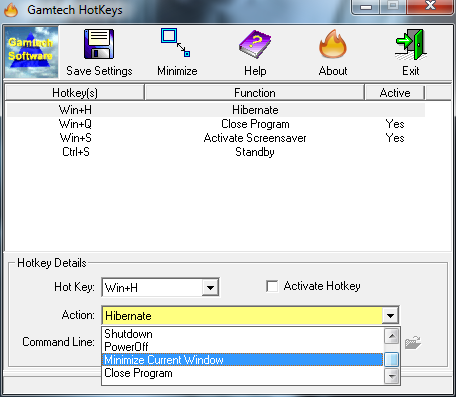
HotKeys is designed to start with Windows and create "Atoms", a system
wide hot-keys that activates user defined actions when specific key
combinations are pressed. It is the easiest way for users to extend the
way the interface with the operating system without upgrading it or
their computer. The HotKeys program allows users to define a wide array
of features of a simple combination of keystrokes so they are literally
"at you fingertips"
Features Include:
- Defined key combinations visible to any
programs that follow the standardized system hot-key (atoms).
- Hot-keys can be defined, modified,
deactivated, and deleted all from a smart, easy to use interface.
Only available hot-key combinations are displayed in the drop-downs.
- Available actions include running a
specified program, activating the screensaver, blanking the screen
(power saving), user logoff, system
restart/shutdown/hibernation/standby, maximizing/minimizing windows,
closing programs, and print screens.
- More actions are added as users make
good suggestions, making this an using "driven product" whose
direction is greatly influenced by those who know it best ... it's
users!
- Great program for Mac users running
Windows looking for those "Missing OS X" keyboard shortcuts ...
easily recreated using HotKeys! No PrtScn key on that
MacBook laptop running Windows! No problem...just define a
replacement with HotKeys.
- Program can start automatically with
windows, runs as an icon in the Icon Tray Notification of the
Windows Taskbar, and can be activated by clicking on the program
icon.
- 32-bit single exe program, small memory
foot print, easy to setup and use, well documented help file, 30-day
"try before you buy" Shareware. You just 32-bit single exe program, small memory foot print,
easy to setup and use, well documented help file, 30-day "try before you buy"
Shareware. You just can't go wrong!
Requires Microsoft ® Windows XP (sp2 or higher)/Vista/Windows 7/Windows 8.x/Windows 10 (32 or 64 bit)
Freeware ZIP file (1.70 mb)
Download HotKeys v1.25
|
|
|
|
|